Every organisation that offers something to its people keeps a list of who is entitled to it. A company keeps one for the holiday homes, an association for its member discounts, a works council for its events. Usually these lists live in spreadsheets, and someone spends a few hours each month bringing them up to date.
appsolut ONE replaces those lists with rules. Instead of maintaining who may use what, you describe once where your people come from and which of them belong where, and the Studio, the admin app of appsolut ONE, works out the rest at every sign-in. This post explains the three building blocks, registers, the membership definition and communities, with a worked example.
The example: Pannoniqa AG
Pannoniqa AG is a fictional manufacturer we use throughout our documentation. It wants to offer two things:
- the "Pannoniqa Portal", a website with news, benefits and holiday offers for all staff, active and retired;
- the "Pannoniqa App", a mobile app with shift information and internal news, for active employees only.
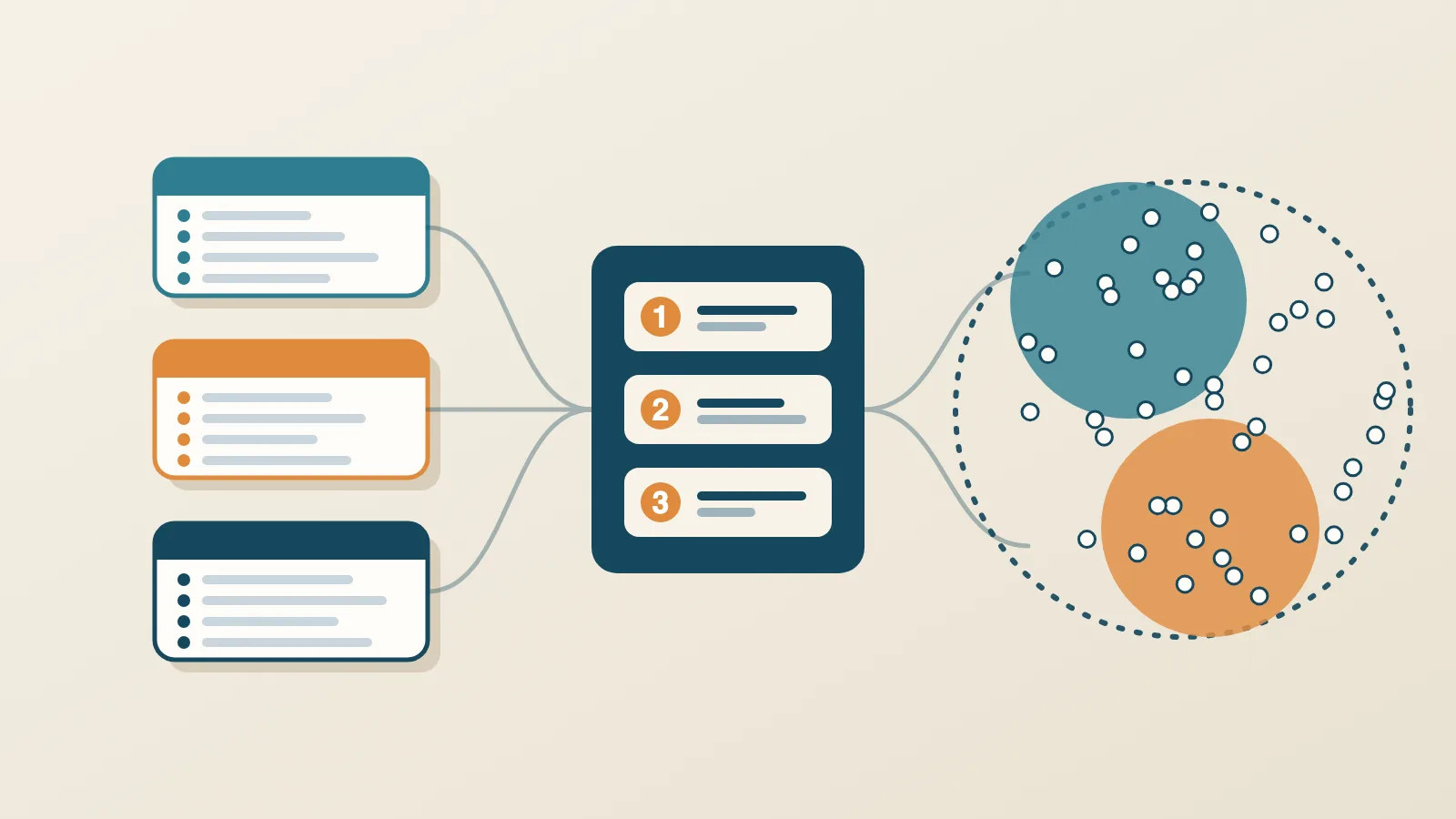
Pannoniqa's people come from three sources: its HR system, a list of retirees kept by the pension department, and a list of works council members.
Building block 1: registers
A register is a list of people who may qualify as members. Every person in it is identified by a member code, and the same person has the same member code in every register of the organisation. At Pannoniqa, that is the personnel number.
There are two kinds of register:
- An external register stays in the organisation's own system and is asked live through the appsolut register API. Pannoniqa connects its HR system as the external register "SAP HR". Nobody uploads the payroll anywhere; the Studio asks SAP when it needs an answer.
- An internal register is kept in the Studio itself, by upload or by hand. Pannoniqa keeps two: "Retirees", uploaded from the pension department's spreadsheet each month, and "Works council".
A register entry carries the facts a person proves themselves with, such as name and date of birth, and a status. Entries can also carry groups, labels such as "Shift workers" or "Apprentices" that later serve as filters.
Building block 2: the membership definition
The registers say who might be a member. The membership definition decides who actually is. It is one ordered list of register assignments, and the Studio's own description says it best: "a person is looked up in each from top to bottom, and the first register that decides wins."
Each register assignment has an outcome, "Qualifies" or "Refuses", and optional filters: "Status", "Groups", "Membership start", "Minimum length of membership" and, for external registers, "Claim". A person who does not pass a register's filters is not decided there, and the next register is asked.
Pannoniqa's membership definition looks like this:
- "SAP HR", Qualifies. Everyone the HR system knows as an employee is a member.
- "Retirees", Qualifies. Former employees on the pension department's list are members too.
- "Works council", Qualifies. This catches the rare works council member who is in neither of the other registers.
The order matters. A person who appears in both "SAP HR" and "Works council" is decided by "SAP HR", because it comes first. That is why the live, authoritative source sits at the top.
The outcome "Refuses" is for exceptions. If Pannoniqa ever needs to exclude certain people from membership altogether, for example a list of blocked members, it can keep them in an internal register with the outcome "Refuses" and place it at the very top. A person found there is refused, "even if a later register would accept them", and so is not a member of any frontend. Keeping members away from one frontend only is a matter for its community, described below.
Before saving, the editor shows how many people a change would make eligible per internal register. "Save and publish" then publishes the definition at once as a new version, and the "Member code query" shows how the saved definition decides one specific person. Every version is kept in the "Version history", and every check records the version it ran under, so the question "why was this person let in last March?" has an answer.
The membership check
Whenever a person proves who they are, the Studio runs a membership check against the definition. It runs in three situations:
- when someone becomes a member, entering their member code and facts on the "Confirm your membership" screen of Login with appsolut;
- at every later sign-in, with the stored member code alone, so a leaver loses access at their next sign-in;
- when the backend of a website or app asks whether a person is eligible, without that person having to sign in.
The answer is always one of three: valid, not valid, or unavailable when an external register cannot be reached. A valid result makes the person an organisation member and lands them in the communities they belong to.
Building block 3: communities
The membership definition answers "is this person one of ours?". A community answers "which of ours?". It is a named filter over the members directory, and each frontend, the websites and apps people sign in to, is served by exactly one community.
Pannoniqa defines three:
- "Active employees", with the filter "Register" set to "SAP HR". This serves the Pannoniqa App.
- "Retirees", with the filter "Register" set to "Retirees".
- "All staff", with no filter at all. As the Studio puts it: "Without filters, every member belongs." This serves the Pannoniqa Portal.
Community filters can also use status, groups and claims from external registers, so a community for "Apprentices in production" is one filter away. Nobody assigns members to communities by hand: a member's communities follow from their last membership check, and a change to a filter applies at once.
Why rules beat lists
The difference shows up the day something changes.
- Someone leaves. They disappear from "SAP HR". At their next sign-in, the check is no longer valid, and the Pannoniqa App stops letting them in. Nobody had to remember to remove them.
- Someone retires. The pension department adds them to "Retirees". They keep their account and member code, move from "Active employees" to "Retirees", and still use the Pannoniqa Portal.
- A new offer appears. HR wants a page only for shift workers. That is a new community with a "Groups" filter, not a new spreadsheet.
Every check is recorded in the check log, with the register that answered, the outcome and the definition version, but never the facts a person typed in. Auditors and works councils can see that the rules were applied, without the Studio keeping more personal data than it needs.
Getting started
Start with the sources you already have. List the systems and spreadsheets that know your people, decide which of them is authoritative, and put it first. Then name the groups that need different offers; each becomes a community. The Studio documentation walks through each building block in detail.